
I had a problem appear this week that I've seen before, but couldn't remember the best resolution for it.
If you don't setup your ImageCache Presets correctly, you sometimes get caught with black stripes down the sides of your images. In my case, this was happening in a view used on the Tyler Brothers website, in this case the page for Youth and Children's Carhartt clothing.
The solution to the black stripes is to define your "canvas" color within your imagecache preset. Here's what I believe to be the best way:
First, install the ImageCache Actions module. This module gives you a great number of options to transform your uploaded images.
Then, add a Define Canvas action. The position of this action is important. In my case, it needs to go between the Scale and Crop actions.
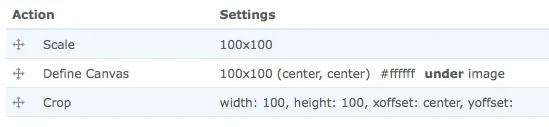
In my situation, I set the canvas to white (#ffffff), make it appear under the image, and it works like a charm.
No more black stripes!